🧳 The Exhume Toolkit
Exhume is a modular Rust toolkit for digital forensics. Its command-line tools and reusable libraries read evidence sources, inspect partitions and filesystems, parse artefacts, build searchable inventories, and search file contents. Modules can be used individually or combined in an investigation workflow, including through Thanatology.
The toolkit is under active development. Validate findings against the source evidence and report problems through the relevant module repository or the Discord server.
Overview
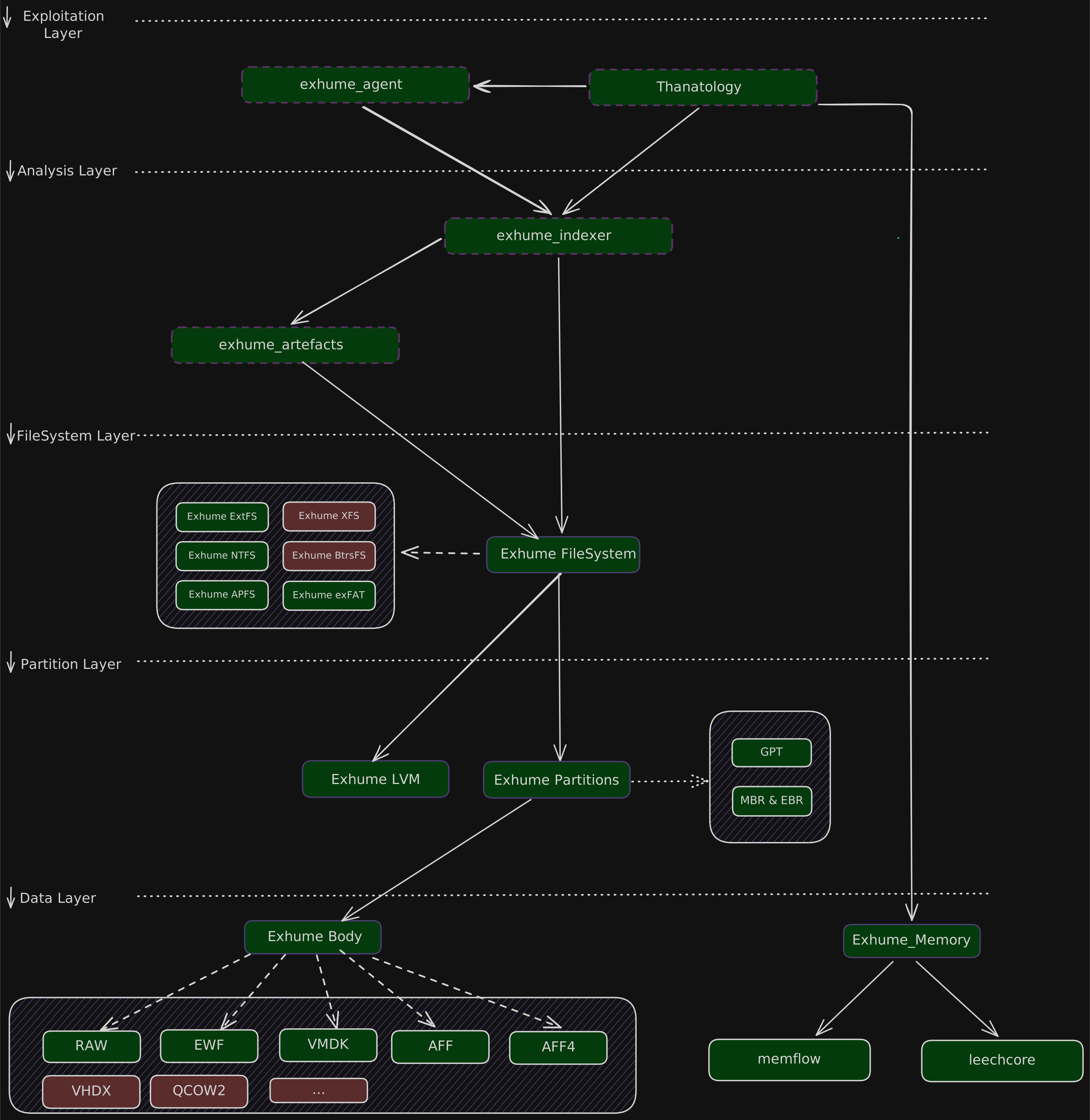
| Module | Purpose |
|---|---|
| exhume_body | Open disk images and other evidence sources through a format-independent interface. |
| exhume_partitions | Locate partitions using GPT, MBR, and extended partition tables. |
| exhume_lvm | Inspect LVM metadata and access logical volumes. |
| exhume_extfs | Read Linux extended filesystem records and file contents. |
| exhume_ntfs | Read NTFS records and file contents. |
| exhume_exfat | Read exFAT records and file contents. |
| exhume_apfs | Inspect APFS containers, volumes, and filesystem records. |
| exhume_filesystem | Browse supported filesystems and extracted folders through a common API; export files, directories, and volumes. |
| exhume_artefacts | Parse operating-system and application artefacts into structured records. |
| exhume_indexer | Store filesystem metadata in SQLite and coordinate file identification, artefact parsing, and timeline generation. |
| exhume_grep | Search indexed file contents with literal or regex patterns. |
| exhume_memory | Acquire and analyse volatile memory through memflow connectors. |
| exhume_agent | Embed a forensic assistant with Exhume tools and a terminal interface. |
Installation
Install Rust
- Linux and macOS
- Windows
curl --proto '=https' --tlsv1.2 https://sh.rustup.rs -sSf | sh
Install rustup from https://www.rust-lang.org/tools/install or use PowerShell:
winget install --id Rustlang.Rustup
Restart your terminal after installation so that cargo is on your path.
Install individual tools
Install the modules needed for your investigation. For example:
cargo install exhume_body --locked
Each module's documentation describes its installation and supported inputs.
Build from source
Clone the workspace and its module submodules:
git clone --recurse-submodules https://github.com/forensicxlab/exhume.git
cd exhume
cargo build --release --workspace
For an existing checkout, initialize any missing submodules with
git submodule update --init --recursive before building.
You can also build an individual module:
cargo build --release -p exhume_body
cargo run -p exhume_body -- --help
Release binaries are written to target/release/. Workspace builds use the
checked-out module sources; published crates may have different versions.
Working with evidence
For a disk image, first inspect the source with exhume_body and locate the
filesystem with exhume_partitions or exhume_lvm. The filesystem and indexer
CLIs take the filesystem offset in bytes and its length in sectors.
Extracted folders need neither value.
Choose the relevant module above for supported formats, command-line examples, and analysis capabilities.
Library integration and source code
Module sections include library documentation where available, with dependency setup and examples for integrating Exhume into Rust applications.
The Exhume workspace links to the individual module repositories. Source-oriented explanations are also available on DeepWiki:
- https://deepwiki.com/forensicxlab/exhume_body
- https://deepwiki.com/forensicxlab/exhume_partitions
- https://deepwiki.com/forensicxlab/exhume_filesystem
- https://deepwiki.com/forensicxlab/exhume_artefacts
- https://deepwiki.com/forensicxlab/exhume_extfs
- https://deepwiki.com/forensicxlab/exhume_ntfs
- https://deepwiki.com/forensicxlab/exhume_exfat
- https://deepwiki.com/forensicxlab/exhume_apfs
- https://deepwiki.com/forensicxlab/exhume_lvm
- https://deepwiki.com/forensicxlab/exhume_indexer
- https://deepwiki.com/forensicxlab/exhume_memory
- https://deepwiki.com/forensicxlab/exhume_grep