🔦 Debunking the Cellebrite (MacQuisition) Advanced Forensics File Format Version 4 (AFF4) implementation

In the objective of implementing the modern Apple File System (APFS) module of the exhume toolkit, a test disk image from a recent macOS system was required. In practice, acquiring physical data from modern Apple hardware (especially with T2 / security constraints) quickly narrows the tooling landscape, and Cellebrite BlackLight / MacQuisition seems to be the default choice.
After acquiring disk image of a modern Apple computer, the output format was AFF4 (Advanced Forensics File Format v4). After not being able to convert this image to a raw disk image on my operating system and, in a quest to make the digital forensics investigation platform agnostic, the next step was obvious: add AFF4 support to exhume_body and make it reliable enough to feed an APFS parser.
In this blog post, I describe that journey and the key findings along the way. The important part is this: MacQuisition produces an AFF4 that strongly diverges from what most public AFF4 descriptions (and many OSS parsers) that I have found assume, which makes existing implementations fail or perform poorly.
Let’s solve this properly.
Motivation
Before going down the rabbit hole, I tried the obvious shortcut: export the AFF4 to a raw disk image and feed that to the APFS parser.
My first attempt was to export to raw with aff4imager
aff4imager -e 'aff4://f47e5cb5-c0e1-4301-b382-67f73f3b02ce' --export_dir test/ ~/IMAGE.aff4
However, the tool output is the following:
Compression method https://code.google.com/p/lz4/ is not supported by this implementation.
Compression method https://code.google.com/p/lz4/ is not supported by this implementation.
Well, that’s… not right and I couldn't mount this aff4 image on my mac. And for this injustice, I redirected my full focus onto this specific AFF4 implementation. The following sections describe the journey and how to reliably read bytes from this MacQuisition-produced AFF4 starting from scratch. Note that my implementation needs to be tested on other images in order to make it more robust. This is not an academic paper, the next sections contain the information and conceptes I have learned and understood and therefore subjective. It could lack some information. Make sure to send me a message if some of what you are reading needs to be modified!
Background on AFF4
AFF4 (Advanced Forensics Format Version 4) is not just a disk image format like we saw with EWF. It is a container + data model designed for forensic acquisition workflows.
AFF version 4 was completed in 2009 by Michael Cohen, Simson Garfinkel, and Bradley Schatz. The design was introduced in their paper: "Extending the advanced forensic format to accommodate multiple data sources, logical evidence, arbitrary information and forensic workflow," published in Digital Investigation 6 (2009), S57–S68. That publication shipped alongside an early reference implementation written in Python. The version later made available via aff4.org is a separate, open-source reimplementation intended to serve as a general-purpose AFF4 library.
A useful snapshot of the motivation and historical context appears in a 2010 Digital Investigation article (vol. 7) titled "Hash based disk imaging using AFF4." The authors contrast earlier approaches to forensic imaging—first, raw “bit-for-bit” acquisition (often described as dd images), and then block-based compression methods that improved storage efficiency but could increase acquisition time. They position AFF4 as a "third generation" forensic format: one that brings multiple image streams, arbitrary metadata, and storage virtualization directly into the file format itself.
Since, some digital forensics vendors were also able to develop their own implementations of AFF4 acquisition, and not a lot of documentation on the evolutions of the format since 2010 is available online.
AFF4 high-level structure overview
As usual, let's start simple (and therefore in a vulgarised way) to describe an AFF4 image. At its base, AFF4 is just a ZIP file using the Zip64 extension. This is the main "container" for storing streams and metadata files.
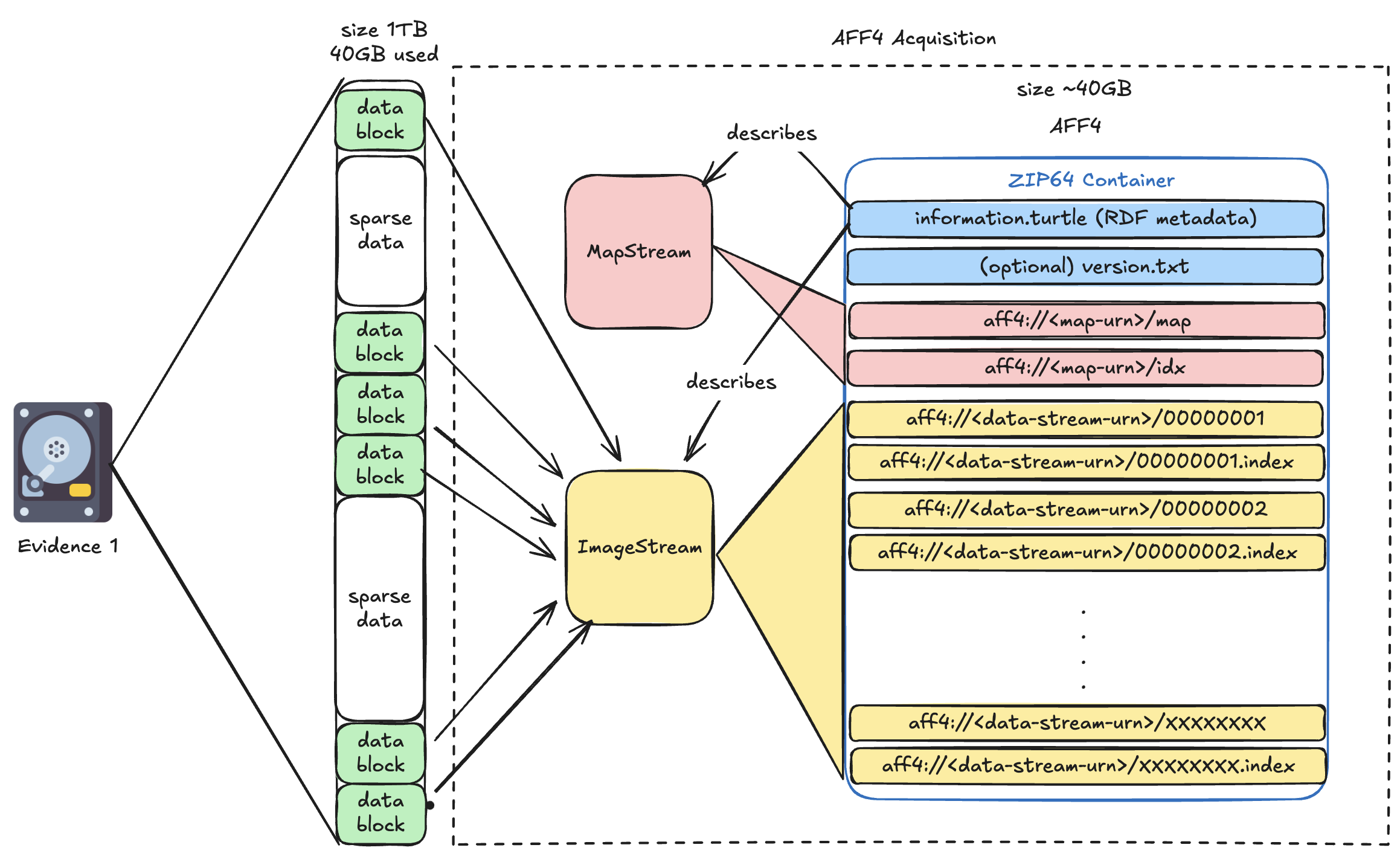
Inside the AFF4 container directory structure, we can find a file named "information.turtle". Unlike the EWF format that we have studied in earlier blog posts, AFF4 doesn't use fixed binary headers for metadata. Instead, it is using the Resource Description Framework (RDF) serialised as "Turtle" (Terse RDF Triple Language). The "information.turtle" zip member contains the metadata needed to describe the layout of the AFF4 image. The metadata stored inside the information turtle informs our tool about record object types, attributes (sizes, chunking parameters, timestamps, tool info), and relationships between objects. I will dive into more details later.
Let's talk vocabulary! in AFF4, each "Object" is identified with a unique URN (Uniform Resource Name).
In the context of this blog post, I divide AFF4 Objects into three categories: The Evidence object(s), the Map object(s) and the Image object(s). The Map & Image are not stored as one blob, AFF4 models the evidence bytes as a sequential, addressable flow of bytes. We will refer to them as MapStream and ImageStream
- The Evidence object is the thing we want to mount/read: for example, a disk image.
- The MapStream object provides the necessary information to obtain one logical "view" of an acquired disk image, a partition image, a file, a carved artefact, etc.
- The ImageStream object is the backing storage that provides the bytes for one or more views.
Note that we can have multiple ImageStream objects if we perform the acquisition of multiple sources. For example, we could acquire a disk image into a first image object and the memory of the machine in another one.
The information Turtle
The information turtle gives us the important metadata between the acquired Evidence(s) layout and the generated logical AFF4 layout. This is not optional decoration: readers must use it to interpret the container like mentioned in the main article about the subject. Let's take a look at the information turtle of the Cellebrite/MacQuisition produced AFF4 image.
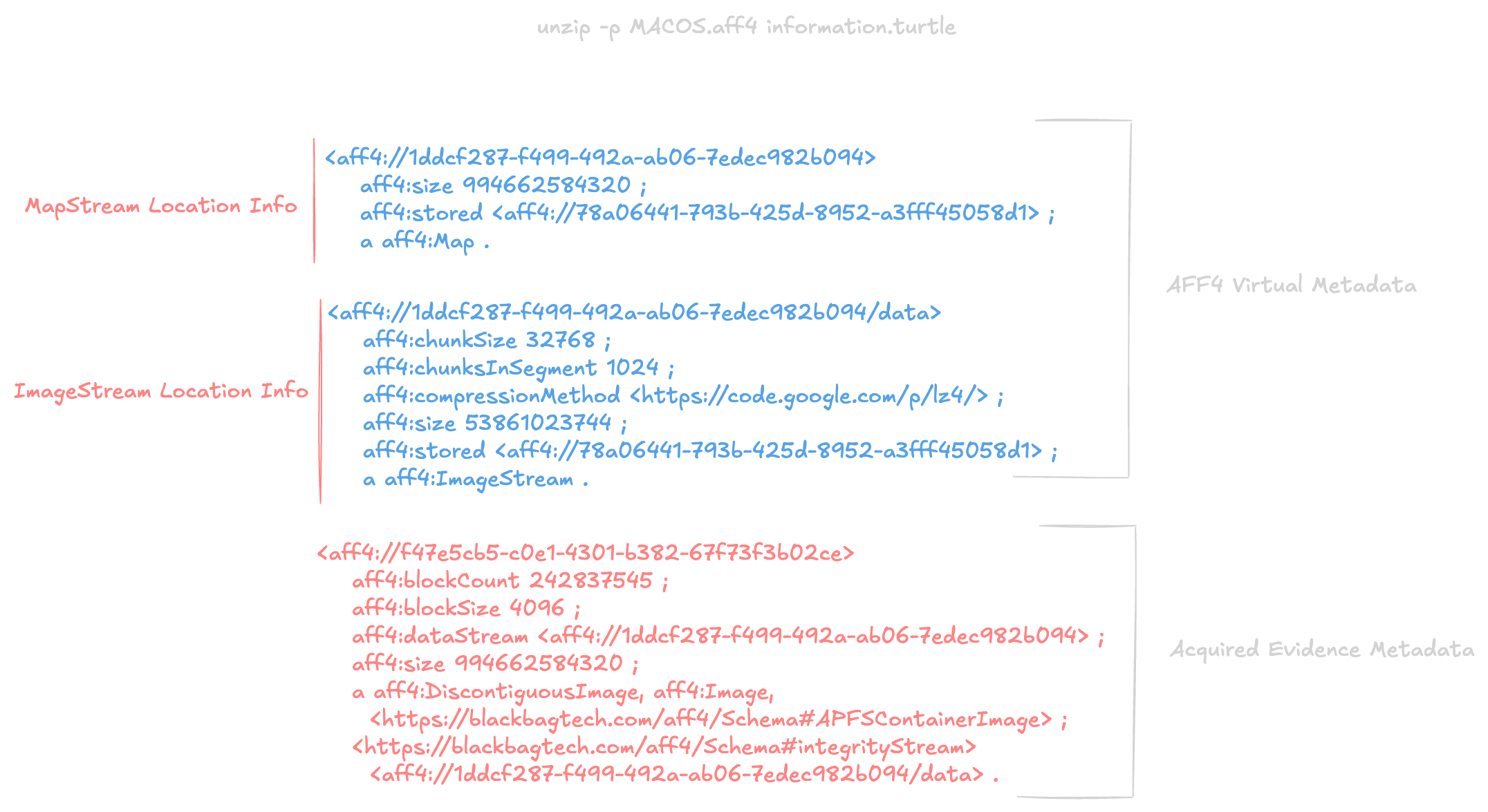
In this example, a total of 242837545 blocks of 4096 bytes each were acquired and are representing an APFSContainerImage.
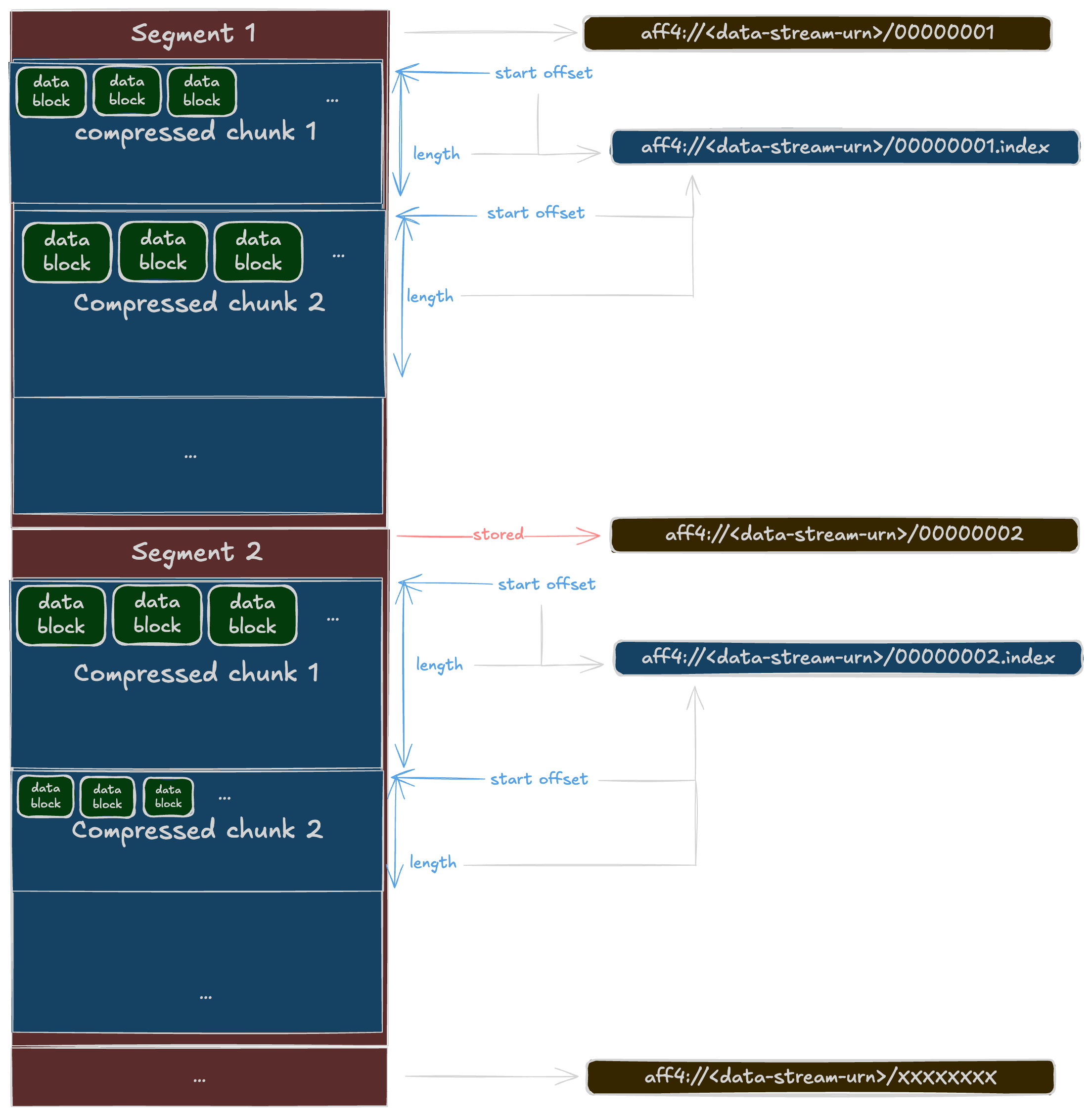
In the AFF4 world, the acquired blocks from the source evidence are concatenated into Chunks. In our example, the size of a chunk is 32768 bytes (= 8 * 4096 = 8 blocks). Multiple chunks are stored into Segments. In our example, the number of chunk in one Segment is 1024. In AFF4 each Segments are backed up as a file in the container (ZIP) for a total size of 53861023744 bytes (~50Gb).
To know the number of segments, we can use the following math: number_of_segments = total_size / size_of_one_segment.
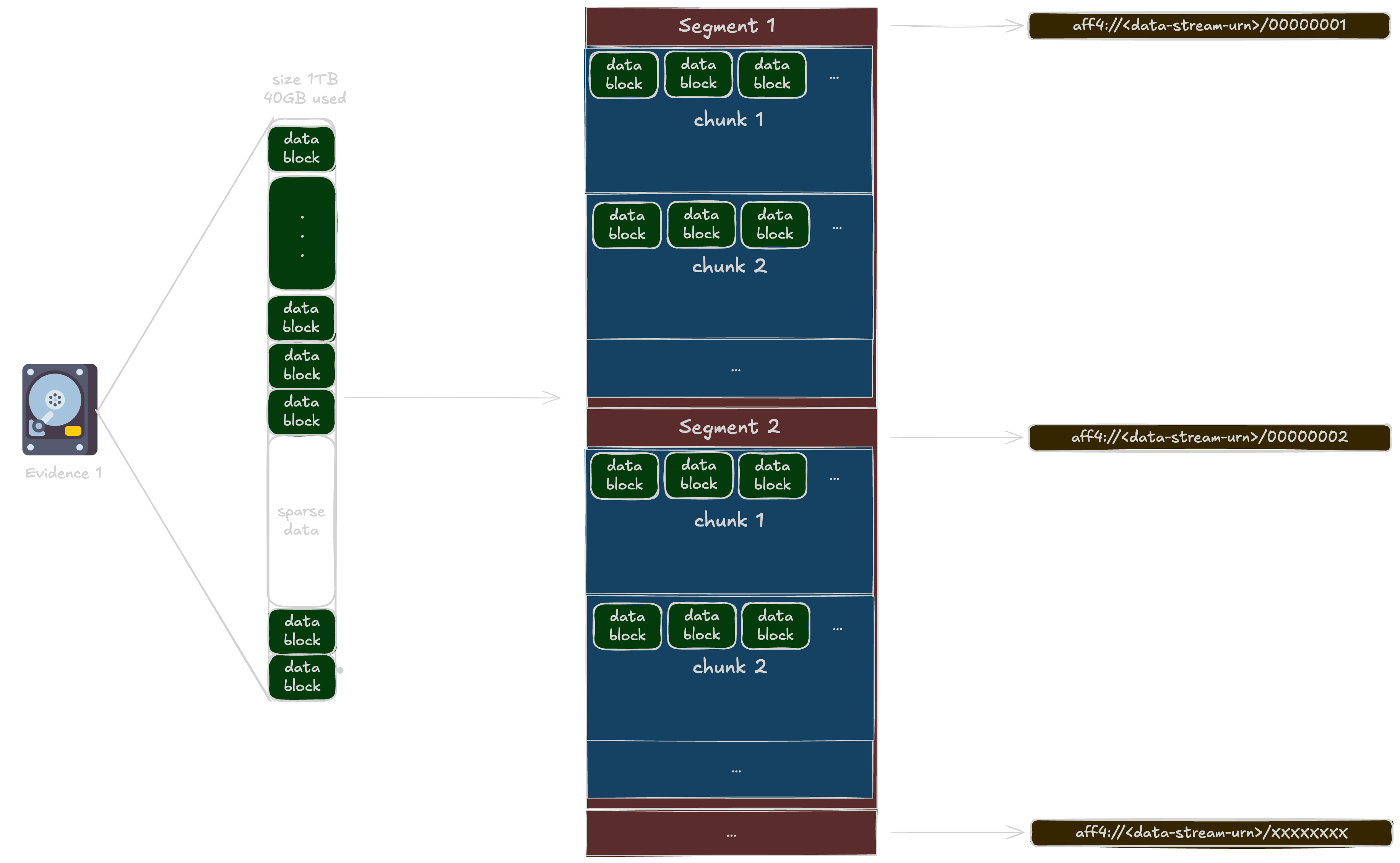
In our case: number_of_segments = 53861023744 / (1024 * 32768) = 1605 Segments !
That is great, we have the necessary metadata to retrieve the information about the Segments, the blocks and the URNs used to store the bytes. But now, how can I extract 512 bytes of data from offset 0x12502 "from the point of view" of the original evidence? AFF4 doesn't store sparse data when using the Map object during acquisition, so it needs to keep track of the original acquired offsets and the image. We still need the Map.
The Map
The Map Object allows us to know the mapping between the acquired image and it's logical representation. The map basically allows us to perform: "If I want 512 bytes from offset 0x1215 in the original (virtual) aquired image, I need to look at offset 0x.... in the AFF4 ImageStream X"
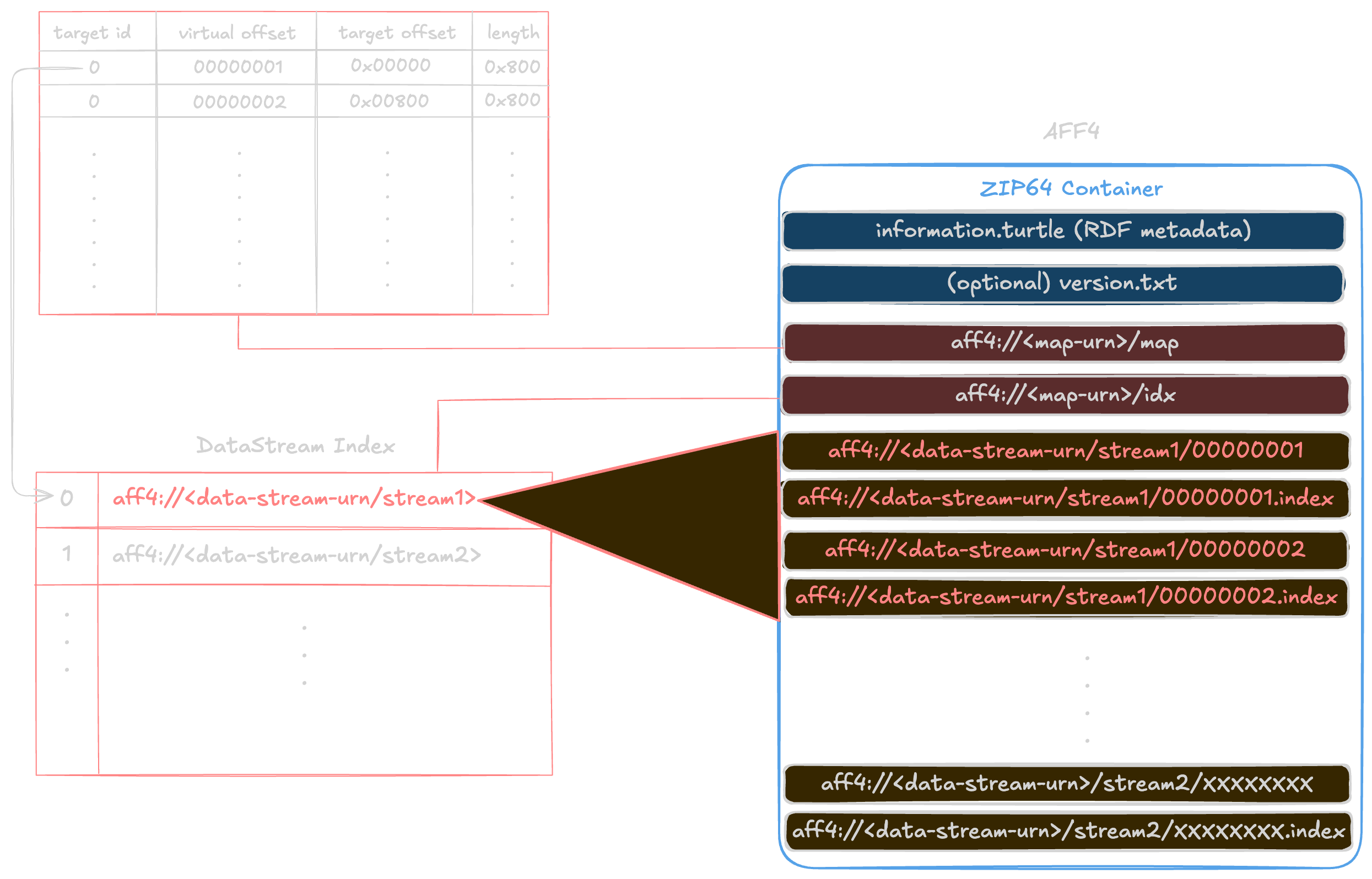
Many published examples show that the MapStream is stored in the AFF4 container (ZIP) as two records:
- The target dictionary: Association between an ID and the name of the byte stream.
- The intervals list: A (originally) text-map composed of multiple records. Each record holds the following:
- Virtual offset: virtual/logical start offset in the map’s logical stream;
- Length: number of bytes in this extent (the run length);
- Target offset: start offset in the backing target stream where those bytes come from;
- Index: which target stream (lookup in the map’s /idx table).
In the case of our Cellebrite/MacQuisition AFF4 container:
- The target dictionary is stored in the ZipFile record: aff4://1ddcf287-f499-492a-ab06-7edec982b094/idx
- The intervals list is stored in the ZipFile record: aff4://1ddcf287-f499-492a-ab06-7edec982b094/map
The Cellebrite/MacQuisition divergence
The following was not documented anywhere I've looked online. This is based on the deep inspection of my acquisition image.
MacQuisition’s AFF4 map stream is not a line-oriented "text map". It is a packed binary array of fixed-size records. Each record is 28 bytes, little-endian:
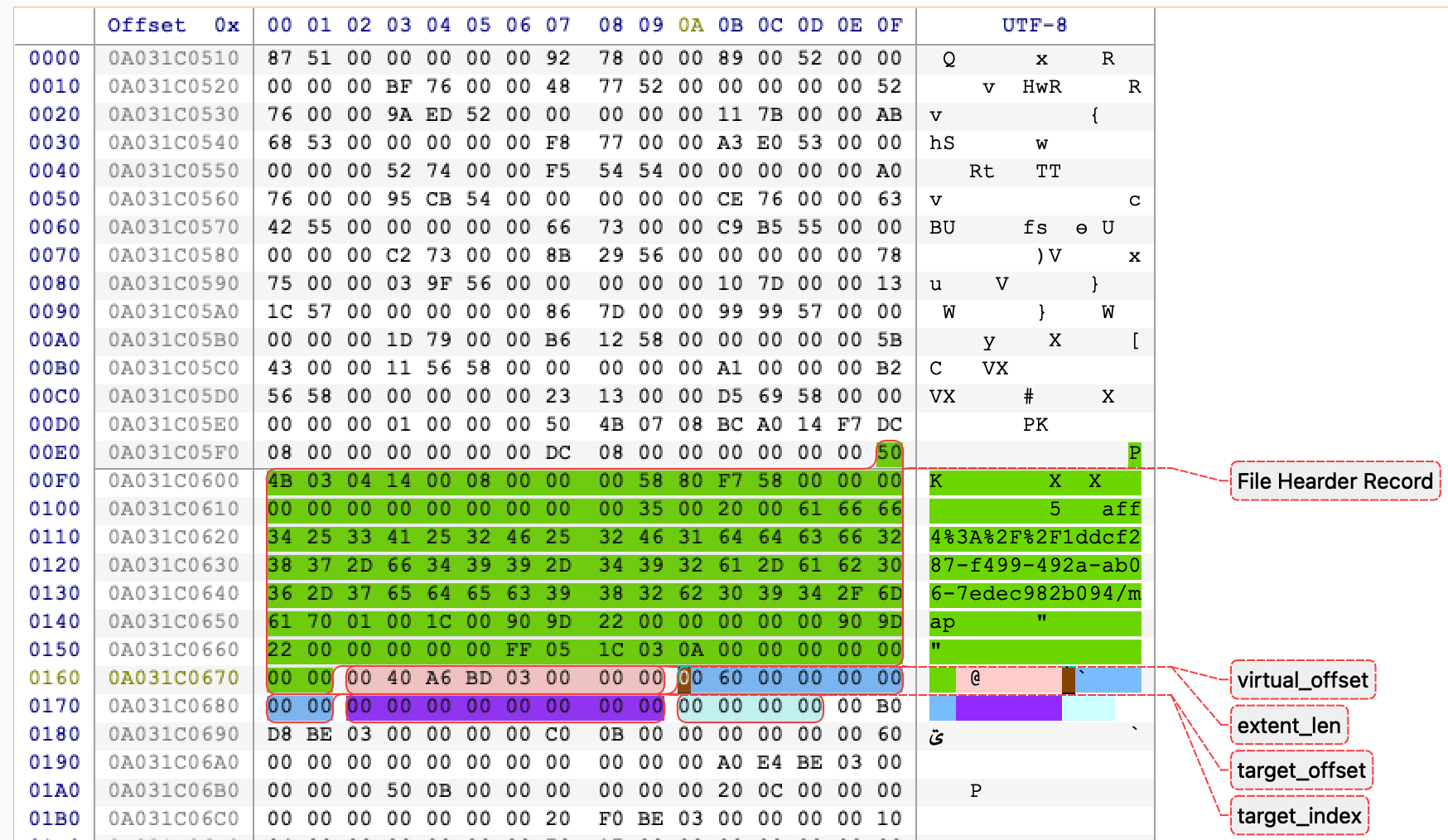
| Byte range (inclusive-exclusive) | Size | Type (LE) | Field | Meaning |
|---|---|---|---|---|
0..8 | 8 | u64 | virtual_offset | Start offset in the virtual image (the reconstructed address space) |
8..16 | 8 | u64 | extent_len | Length in bytes of this mapping run (0 may be used as a sentinel/hole marker) |
16..24 | 8 | u64 | target_offset | Offset in the target stream where data is sourced from |
24..28 | 4 | u32 | target_index | Index into the adjacent idx table (string table of target URIs) |
For a given record:
-
The virtual range covered is:
virtual_offset .. virtual_offset + extent_len -
The corresponding bytes are read from:
target_uri[target_index]at offsettarget_offset
The idx table next to it
The map does not store the target URIs inline. It is using the member next to it (.../idx) which is a NUL-separated string table:
- Split by
0x00 - Each string is a target URI (e.g.
aff4://.../data) target_indexin the 28-byte record selects one of these strings
This reduces map size significantly when many records refer to the same target stream.
The Segments
In the AFF4 world, and specifically in our case, each segment can be backed by a file in the AFF4 container (ZIP). For example:
- aff4://1ddcf287-f499-492a-ab06-7edec982b094/00000001 contains the segment number 1
- aff4://1ddcf287-f499-492a-ab06-7edec982b094/00000002 contains the segment number 2
- etc..
In our case we have 1605 segments, so it will go from aff4://1ddcf287-f499-492a-ab06-7edec982b094/00000001 to aff4://1ddcf287-f499-492a-ab06-7edec982b094/00001605
The Cellebrite/MacAquisition divergence
The following is not documented anywhere I've looked online. This is based on the inspection of my acquisition image.
If you come back to the metadata of the information turtle showed, you can see a property named:
aff4:compressionMethod <https://code.google.com/p/lz4/> ;
That means every chunk is compressed before being stored in the segments. So we actually have segments that can contain compressed chunks using the lz4 compression method
In the case of Cellebrite/MacAquisition, and in order to keep track of the variable lengths and offsets of each compressed chunks, they also stores an index file alongside each segment member. These "segments indexes" are composed of 12-byte entries.
Each entry is 12 bytes, little-endian, and it encodes (compressed offset, compressed length) for one chunk inside the corresponding segment member’s payload.
| Byte range (inclusive-exclusive) | Size | Type (LE) | Field | Description |
|---|---|---|---|---|
0..4 | 4 | u32 | lo | Low 32 bits of the chunk blob offset (c_off) within the segment member payload |
4..8 | 4 | u32 | hi | High 32 bits of the chunk blob offset (c_off) within the segment member payload |
8..12 | 4 | u32 | len | Length in bytes of the chunk blob (c_len) stored in the segment member |
So why would you compress the chunks? It's clearly not to be able to store more chunks into each segments because from the metadata we have, the segment boundaries are stable and we just benefit from smaller members. The main reason is probably to lower disk I/O when performing data read from disk to reconstruct a chunk in memory.
How to read data
At this point, we know the container is Zip64, and that MacQuisition’s AFF4 differs in two key places:
- The map is a packed binary array (28-byte records), not a line-based text map
- The data is stored as LZ4-compressed chunks inside segment members, with a per-segment .index file to locate each compressed chunk
So reading bytes can happen in the following order: virtual offset → map interval → target stream offset → segment + chunk → (offset,len) via index → LZ4 decode → slice.
In order to implement the exhume_body aff4 support, I first needed to parse the Zip64 central directory and build a dictionary of member name → {header offset; sizes; zip compression method}. Not going into details on how to parse a Zip64 archive but just note that I am using it constantly to fetch information.turtle, the map members, segment members, and the per-segment .index files.
Then, from the Turtle RDF metadata, we extract the values that drive all addressing math:
- image_size
- chunk_size
- chunks_in_segment
- compressionMethod (here: LZ4)
- the URNs/base paths for the map object and the data stream
As mentioned in my previous observations, Cellebrite/MacQuisition stores two adjacent map members:
- .../idx → NUL-separated string table of target URIs
- .../map → packed 28-byte records (LE): (virtual_offset:u64, extent_len:u64, target_offset:u64, target_index:u32)
I'm turning these into an in-memory interval list:
- each interval maps a virtual range to (target_uri, target_offset)
- sort by virtual_offset
Reading N bytes at virtual offset V
The following pseudo-code algorithm is a summary of the actions performed to read N bytes at a virtual offset V.
- find which interval covers the current position (binary search)
- if no interval: it’s a hole → zero-fill
- if interval found:
- compute the logical offset inside the target stream:
- logical_off = interval.target_offset + (pos - interval.virtual_offset).
- fetch bytes from the target stream at logical_off (next section).
- repeat until the request is satisfied.
Integration to the exhume Toolkit
Well, the final result is that exhume_body now supports aff4 as a new format and therefore all of the exhume_modules above (like exhume_filesystem, exhume_partitions, ...).
In order to test the implementation, you can perform the following:
cargo install exhume_body
exhume_body -b /PATH/TO/IMAGE.aff4 -f aff4 -s 512 -offset 0x0
Example output:
 Processing the file '/PATH/TO/IMAGE.aff4' in 'aff4' format...
Zip64 EOCD Record located at: 0xa0344ac91
Central Directory Total Entries: 0xc91
Central Directory Size: 0x602c2
Central Directory: 3217 entries starting at 0xa033ea9cf
Metadata: size                     = 994662584320
Metadata: stored                   = aff4://78a06441-793b-425d-8952-a3fff45058d1
Metadata: chunkSize                = 32768
Metadata: chunksInSegment          = 1024
Metadata: compressionMethod        = https://code.google.com/p/lz4/
Metadata: hash                     = 1430c174c043522ed31c52896c1effb597150437
Metadata: hash                     = a91b7434416c73226fb348ce43808d1c
Metadata: size                     = 53861023744
Metadata: stored                   = aff4://78a06441-793b-425d-8952-a3fff45058d1
Metadata: blockCount               = 242837545
Metadata: blockSize                = 4096
Metadata: dataStream               = aff4://1ddcf287-f499-492a-ab06-7edec982b094
Metadata: size                     = 994662584320
Metadata: APFSContainerType        = https://blackbagtech.com/aff4/Schema#APFST2ContainerType
Metadata: ContainsExtents          = true
Metadata: ContainsUnallocated      = false
Metadata: integrityStream          = aff4://1ddcf287-f499-492a-ab06-7edec982b094/data
--- Parsing Binary Map Stream: aff4%3A%2F%2F1ddcf287-f499-492a-ab06-7edec982b094/map ---
Using idx table member: aff4%3A%2F%2F1ddcf287-f499-492a-ab06-7edec982b094/idx
idx table contains 1 target strings
Built 81020 merged intervals. First v_off=0x0
 ------------------------------------------------------------
 Selected format: AFF4 / AFF4-L
 Description: AFF4 ImageStream (Zip volume).
 Sector size: 512
 Evidence : /PATH/TO/IMAGE.aff4
AFF4 image_size=0xe796829000, chunk_size=0x8000, chunks_in_segment=1024, compression=Lz4, intervals=81020
00000000: efbf bdef bfbd efbf bdef bfbd efbf bd3f  ...............?
00000010: 7001 0000 0000 0000 0073 efbf bd00 0000  p........s......
00000020: 0000 0001 0000 efbf bd00 0000 004e 5853  .............NXS
00000030: 4200 1000 0029 6879 0e00 0000 0000 0000  B....)hy........
00000040: 0000 0000 0000 0000 0000 0000 0002 0000  ................
00000050: 0000 0000 00ef bfbd 18ef bfbd efbf bdef  ................
00000060: bfbd efbf bd40 0eef bfbd db85 7266 c6ab  .....@......rf..
00000070: 69ef bfbd 4704 0000 0000 0074 efbf bd00  i...G......t....
00000080: 0000 0000 0018 0100 005c 6c00 0001 0000  .........\l.....
00000090: 0000 0000 0019 0100 0000 0000 00ef bfbd  ................
000000a0: 0000 0062 3700 00ef bfbd 0000 0002 0000  ...b7...........
000000b0: 005d 3700 0005 0000 0000 0400 0000 0000  .]7.............
000000c0: 00ef bfbd efbf bd11 0000 0000 0001 0400  ................
000000d0: 0000 0000 0000 0000 0064 0000 0002 0400  .........d......
000000e0: 0000 0000 0006 0400 0000 0000 001b 0500  ................
000000f0: 0000 0000 001d 0500 0000 0000 001f 0500  ................
00000100: 0000 0000 0021 0500 0000 0000 0001 0604  .....!..........
00000110: 0000 0000 0000 0000 0000 0000 0000 0000  ................
00000120: 0000 0000 0000 0000 0000 0000 0000 0000  ................
00000130: 0000 0000 0000 0000 0000 0000 0000 0000  ................
00000140: 0000 0000 0000 0000 0000 0000 0000 0000  ................
00000150: 0000 0000 0000 0000 0000 0000 0000 0000  ................
00000160: 0000 0000 0000 0000 0000 0000 0000 0000  ................
00000170: 0000 0000 0000 0000 0000 0000 0000 0000  ................
00000180: 0000 0000 0000 0000 0000 0000 0000 0000  ................
00000190: 0000 0000 0000 0000 0000 0000 0000 0000  ................
000001a0: 0000 0000 0000 0000 0000 0000 0000 0000  ................
000001b0: 0000 0000 0000 0000 0000 0000 0000 0000  ................
000001c0: 0000 0000 0000 0000 0000 0000 0000 0000  ................
000001d0: 0000 0000 0000 0000 0000 0000 0000 0000  ................
000001e0: 0000 0000 0000 0000 0000 0000 0000 0000  ................
000001f0: 0000 0000 0000 0000 0000 0000 0000 0000  ................
00000200: 0000 0000 0000 0000 0000 0000 0000 0000  ................
00000210: 0000 0000 0000 0000 0000 0000 0000 0000  ................
00000220: 0000 0000 000a                           ......
Conclusion
Well, this journey was painful. But now I can read MacOs MacQuisitions and begin developing the Exhume APFS module, which was the original objective for the Thanatology project.
My implementation HAS TO BE CONSIDERED AS VERY SPECIFC to the Cellebrite/MacQuisition AFF4 images for now until I put my hands on more images. Feel free to test it, raise any issues you might find on Github or on the dedicated Discord Server.